

First run
Start tongs from any directory:
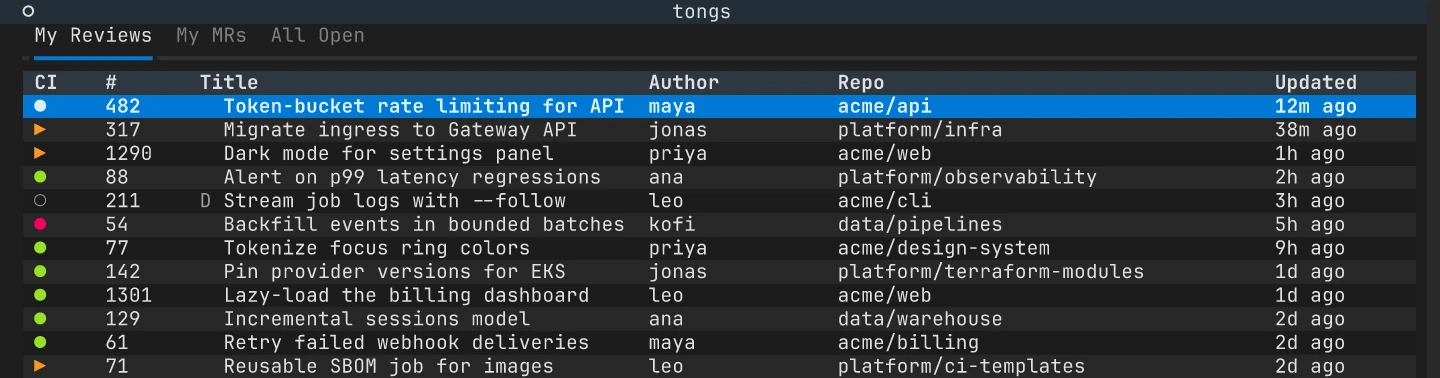
tongsThe inbox opens at once. While it loads, tongs looks for your repositories and asks each forge for open reviews.
What tongs scans
Section titled “What tongs scans”tongs walks your scan root, ~/git by default, up to five directory levels
deep. For each git repository it finds, it reads the remotes and works out the
forge:
- github.com and gitlab.com are recognized on their own.
- Hostnames listed under
[hosts.*]in the config use the forge you set there.
Repositories with any other remote, including a self-hosted forge that is not
listed under [hosts.*], or with no remote at all, are skipped. tongs does not
guess the forge from a hostname.
To scan a different directory for one run, pass --scan-root (or -d):
tongs --scan-root ~/projectsTo change it for good, set scan_root in the config file:
[general]scan_root = "~/projects"scan_depth = 5The inbox tabs
Section titled “The inbox tabs”The inbox has three tabs. Each one loads the first time you open it, fetching from every repository in parallel.
| Key | Tab | Shows |
|---|---|---|
| 1 | My Reviews | Reviews where you are a requested reviewer |
| 2 | My MRs | Reviews you opened |
| 3 | All Open | Every open review across your repositories |
Press s to cycle the sort order and r for the repository list, where Enter scopes the inbox to one project.
Open a review
Section titled “Open a review”Move to a row and press Enter. The review opens on its overview, with four more tabs a number key away:
| Key | Tab |
|---|---|
| 1 | Overview |
| 2 | Diff |
| 3 | Commits |
| 4 | Discussion |
| 5 | Pipeline |
Press Esc to go back to the inbox. A few keys work almost everywhere:
| Key | Action |
|---|---|
| ? | Show a short help hint |
| CtrlP | Command palette |
| CtrlR | Refresh the current view |
| o | Open the review in your browser |
| q | Back, or quit from the inbox |
The Keybindings reference lists every key.
If something is missing
Section titled “If something is missing”No repositories found
Section titled “No repositories found”- Check that the scan root holds git repositories with GitHub or GitLab remotes.
- Raise
scan_depthif your repositories sit more than five levels below the scan root. - For a self-hosted forge, add a
[hosts.*]section. See Self-hosted forges.
A tab reports a skipped host
Section titled “A tab reports a skipped host”tongs shows a warning naming the host and the reason, usually a missing or expired credential. See If sign-in fails.
Slow startup
Section titled “Slow startup”- Lower
scan_depthif tongs walks too many directories. - Lower
max_parallelin[concurrency]if you hit forge rate limits. It defaults to 8 requests at a time.
- Inbox covers filtering, sorting and the repository list.
- Diffs and comments covers reading a change and commenting on it.
- Review drafts covers collecting comments and submitting them as one review.