

Review drafts
Your drafts survive. Review mode saves every comment to disk as you write it, and nothing reaches the forge until you submit.
Outside review mode, a comment posts to the forge as soon as you save it. In review mode, general comments, inline comments, suggestions and replies go into a local draft instead. When you are done, you pick a verdict and submit the whole draft as one review.
Start a review
Section titled “Start a review”Open a review from the inbox and press CtrlG. tongs creates a draft bound to the revision you are looking at and says “Review mode started. Comments are now saved locally.”
A status bar stays on screen while the draft is active:
REVIEW DRAFT | 2 comments | v3 | editable | Ctrl+G reviewIt shows the comment count, the draft version and its state. It adds
old revision, version conflict or saving when they apply.
Add comments
Section titled “Add comments”Use the same keys as always. With a draft active, each one saves to the draft:
| Key | Where | Saves |
|---|---|---|
| c | Overview or diff | A general comment, or an inline comment on the selected line |
| ShiftJ / ShiftK, then c | Diff | An inline comment on a range of lines |
| F3 | Diff | A suggestion on new-side lines |
| r | Diff or Discussion tab | A reply to an existing thread |
Press CtrlS in the comment editor to save. The notification reads “Draft
saved locally.” Inline draft comments show in the diff under their line as
DRAFT new: ... or DRAFT old: ..., in both unified and split view.
Resolving a thread with ShiftR is not part of the draft. It still acts on the forge right away.
Your drafts survive
Section titled “Your drafts survive”Every save is a transaction in a local SQLite database, so a draft outlives a crash, a closed terminal or a reboot. Open the same review again and tongs loads the draft for you.
A review can hold more than one draft, for example one per revision. Press Alt] to cycle through them.
Submit the review
Section titled “Submit the review”Press CtrlG again to open the review draft screen.
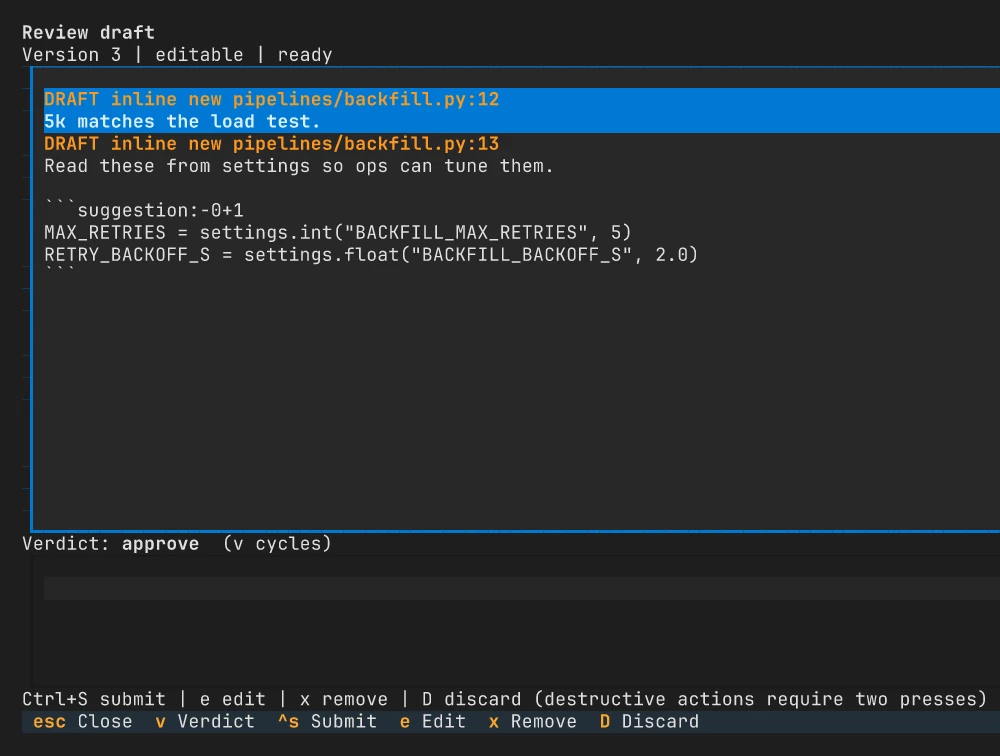
The screen lists every draft comment, the verdict and a summary box. From here:
| Key | Action |
|---|---|
| v | Cycle the verdict |
| CtrlS | Submit the review |
| e | Edit the selected comment |
| x | Remove the selected comment (press twice) |
| ShiftD | Discard the whole draft (press twice) |
| Esc | Close (press twice to drop unsaved summary or verdict changes) |
The verdicts are Comment and Approve on both forges. GitHub adds Request changes, which needs a summary. Pressing ShiftA while a draft is active opens this screen instead of approving on its own.
On GitHub, a draft whose comments are all inline goes up as a single pull request review, with its summary and verdict. Otherwise tongs sends each comment in order, then the summary and the verdict. When the last step lands, tongs says “Review submitted.” and removes the draft.
When a submission is interrupted
Section titled “When a submission is interrupted”tongs records each step before it sends it, so an interrupted submission can pick up where it stopped. It never repeats a write it cannot confirm.
- Paused. A step failed with a clear answer from the forge. Press r to resume the remaining steps.
- Unknown. tongs cannot tell whether a step reached the forge. Check the review on the forge, then choose one:
| Key | Action |
|---|---|
| 1 | Retry the remaining steps. This may post a duplicate. |
| 2 | Return the remaining comments to local editing |
| 3 | Mark the remaining comments as submitted |
Each choice needs a second press.
When the review changes
Section titled “When the review changes”A draft belongs to the revision you started it on. When new commits arrive,
the bar shows old revision. You can still read that draft, but you cannot
submit it or add inline comments or replies to it.
Open the draft screen and press ShiftN to start a draft for the current revision. General comments and replies to threads that still exist carry over. Inline comments stay in the old draft, so you can read them and add them again on the new diff.
If the same draft changes somewhere else, such as in a second terminal or the
desktop app, tongs refuses the save and keeps your text. The bar shows
version conflict, and the draft screen shows the recovered summary and
verdict so you can try again.
Every key on this page is also listed in the keybindings reference.