

Diffs and comments
The Diff tab is where you read a review and comment on it. Press 2 from any review to open it.
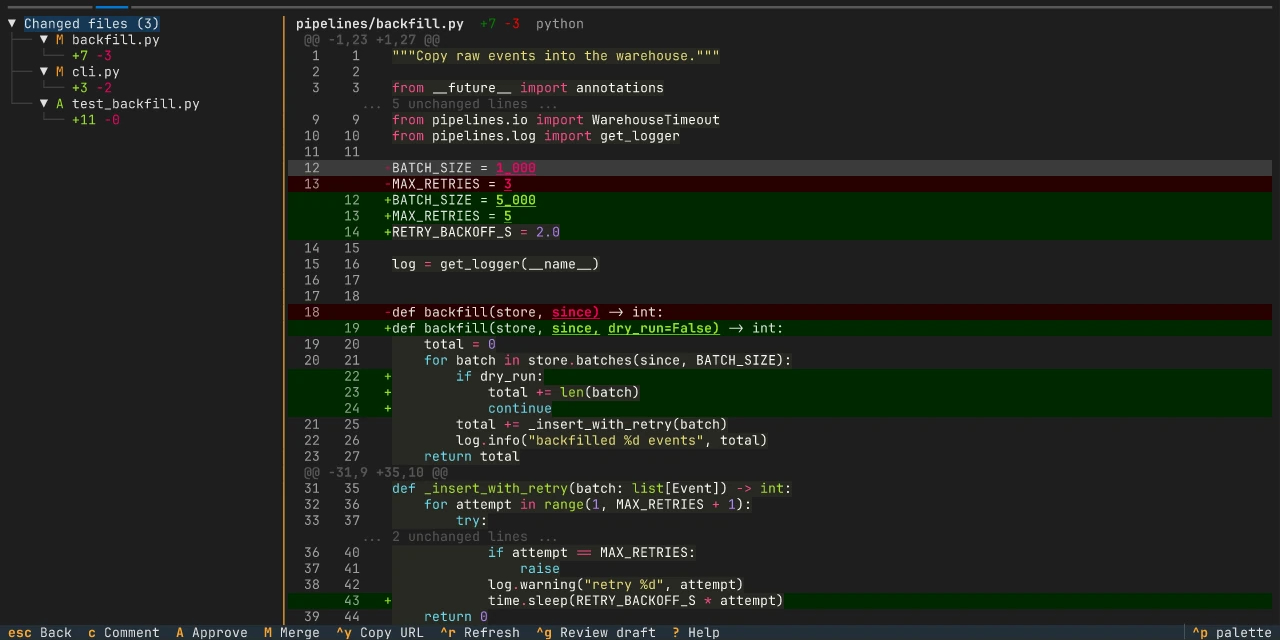
Layout
Section titled “Layout”The Diff tab has two panes:
- File tree on the left. It lists every changed file with a status letter
(
Mmodified,Aadded,Ddeleted,Rrenamed), its+and-line counts, and how many of its comment threads are open or resolved. - Diff on the right. It shows the selected file with syntax highlighting, line numbers and gutter markers.
Unified and split view
Section titled “Unified and split view”Press v to switch between unified and split view. Split view shows the old
and new versions side by side with their lines aligned. Press h to move
focus to the old side and l to move it to the new side. To open every diff
in split view, set diff_style = "split" in the
[ui] table.
When the terminal is too narrow for split view, tongs uses unified view and tells you: “Split view selected; using unified at this width”.
Moving around
Section titled “Moving around”| Key | Action |
|---|---|
| j / k | Move the cursor down or up one line |
| n / ShiftN | Next or previous file, wrapping at either end |
| ] / [ | Next or previous comment thread |
Click a file in the tree to jump straight to it.
Selecting lines
Section titled “Selecting lines”Select a range of lines to comment on several lines at once or to suggest a replacement.
| Key | Action |
|---|---|
| ShiftJ | Extend the selection down |
| ShiftK | Extend the selection up |
| Ctrl + click | Extend the selection to the clicked line |
| Esc | Clear the selection |
Reading the diff
Section titled “Reading the diff”- Syntax highlighting. tongs picks a highlighter from the file name, using Pygments.
- Word-level changes. In the unified view, the words that changed inside a changed line are bold and underlined, so a small edit in a long line stands out.
- Unchanged lines. The forge sends only the changed parts of a file, so
the lines around them start out hidden behind a row such as
... 42 unchanged lines (e to expand) .... See Expanding context. - Markdown preview. On a Markdown file, press m to switch between the diff and the rendered file.
- Files without a diff. When the forge does not expose a file’s diff, the file stays in the tree with its line counts and the pane says why. Binary files, empty files, mode changes and pure renames get a short label instead of a diff. Press o to open the review in your browser. A diff that is too large for the forge can be generated in tongs instead; see Large files.
Expanding context
Section titled “Expanding context”A diff shows each change with a few lines around it. The rest of the file
hides behind gap rows: one above the first change, one between each pair of
changes and one below the last. Each row says how many lines it hides, for
example ... 120 unchanged lines (e to expand) .... The row below the last
change reads ... more lines below (e to expand) ... until tongs knows how
long the file is. Long unchanged stretches inside a change fold the same way.
| Key | Action |
|---|---|
| e | Expand the gap row under the cursor, or collapse the expanded lines under it |
| ShiftF | Show the whole file, or go back to what you had expanded |
- One request per file. The first e or ShiftF on a file reads it from the forge at the review’s latest commit, once. Later expands and the whole-file view use that copy. Opening a diff never reads a file, and a fold inside a change opens without any request.
- Collapse. e toggles. On an expanded line it hides that gap again and puts the cursor on its gap row. On a line shown from a fold inside a change it folds those lines again. Lines a change always showed stay as they are. Collapsing needs no request, and e on the gap row brings the lines back from the copy tongs already has. In the whole-file view, e on a line it showed turns the view off and hides that gap or fold, keeping the gaps you had expanded before.
- Both views. Expanding works the same in unified and split view, and v keeps what you expanded. Expanded lines show both line numbers and the same syntax highlighting as the rest of the file.
- Whole file. ShiftF works per file. The file header shows Full file while it is on, and moving to another file turns it off.
- Read-only lines. You can’t comment on an expanded line. GitHub accepts comments only on lines inside the changed parts, and tongs checks the same rule for every forge. c, F3, d, r and ShiftR on an expanded line say so. On a fold inside a change they ask you to press e first. A selection can’t cross a gap row between changes, but it can span a fold inside a change.
- Limits. tongs expands files up to 2 MiB and 20,000 lines. Past that, pressing e says the file is too large. ShiftF also stops at 20,000 lines on screen and asks you to expand single gaps instead.
- Files that can’t expand. An added or deleted file already shows every line. Binary files, symlinks and submodules have no lines to expand, and tongs says why. A file the forge did not send expands once you generate its diff, as described in Large files.
Large files
Section titled “Large files”When a file’s diff is too large for the forge to send, GitHub leaves it out and GitLab marks it as too large. tongs keeps the file in the tree and shows:
This file’s diff is too large for the forge to send. Press e to generate it locally (downloads both versions of the file).
When the forge sends only part of a file’s diff, the same notice stands above the parts it sent, in both views. e on a fold inside those parts opens the fold, and on a line the fold showed it folds them again; anywhere else it generates the diff.
| Key | Action |
|---|---|
| e | Generate the diff of a large file, or cancel it while it runs |
- How it works. tongs downloads the file as it was where the branch started and as it is at the review’s latest commit, compares the two on your computer, and shows the result like any other diff, in unified and split view. The file header shows Generated locally. GitLab already reports where the branch started; on GitHub, tongs asks the forge for it with one extra request. An added or deleted file downloads only the version it has.
- Cancel. While it runs, the notice reads “Generating diff locally (downloading 2 files). Press e again to cancel.” Press e again to stop it. CtrlR, leaving the review and reloading the diff stop it too. The notice then says “Cancelled. Press e to try again.”
- Expanding a generated diff. Gap rows, collapsing and ShiftF work as described in Expanding context, with no further request, because tongs already has the file.
- Kept while tongs runs. tongs keeps the last 8 generated diffs in memory, so generating the same file again, for example after reopening the review, needs no download. A new commit on the review starts over.
- Limits. Each version of the file may be up to 5 MiB and 100,000 lines, and the generated diff up to 100,000 lines. Past that, or when a version is binary, tongs says so and leaves the notice in place. Press o to read the file in your browser instead.
- No comments. The forge has no diff for this file to attach a comment to, so it would refuse one. c, F3 and r on a generated diff say “Comments are not available on a diff generated locally.”, also while a review draft is open. Comment on the file in the browser instead.
Comment threads in the diff
Section titled “Comment threads in the diff”Existing threads show as gutter markers next to their lines. Press d on a marked line to expand or collapse its thread. On a line with a thread, press r to reply and ShiftR to resolve or reopen it. tongs asks you to press ShiftR a second time to confirm.
Adding a comment
Section titled “Adding a comment”- Move to the line, or select the lines, you want to comment on.
- Press c to open the comment editor at the bottom of the screen.
- Write your comment.
- Press CtrlS to submit, or Esc to cancel. If the editor has text, press Esc twice to discard it.
Suggesting changes
Section titled “Suggesting changes”- Select the lines you want to replace. Suggestions work on the new side of the diff only.
- Press F3. tongs opens your editor with the selected code filled in.
- Edit the code into the replacement you suggest.
- Save and close the editor.
- tongs posts the suggestion in the forge’s own syntax:
```suggestionon GitHub and```suggestion:-0+Non GitLab.
If you close the editor without changing the code, tongs cancels the suggestion.
External editor
Section titled “External editor”Press F2 in the comment editor to continue the comment in an external editor. tongs moves the text to the editor and back when you save and close it.
F2 and F3 use the command set in the
[editor] table, then $VISUAL, then
$EDITOR, then the first of nvim, vim, vi and nano found on your
PATH. external_editor_enabled = false turns them off. They are not
available on Windows.