

Inbox
The inbox is the first screen tongs shows. It lists open pull requests and merge requests from GitHub and GitLab in one table. tongs calls both of them reviews.
How repo discovery works
Section titled “How repo discovery works”On startup, tongs walks your scan root (~/git by default) up to scan_depth
levels deep, five by default. Each directory with a .git folder is a
repository, and so is a git worktree. tongs follows symlinked directories and
skips hidden directories and repositories nested inside another repository.
For each repository, tongs reads the git remotes and works out:
- whether the remote points to GitHub or GitLab. Hosts named in
[hosts.*]count, and so do hostnames that containgithuborgitlab. - the project namespace and name.
Repositories with no recognized remote, such as local-only or Bitbucket repositories, are skipped without a message. Set the scan root and depth in the configuration.
Inbox tabs
Section titled “Inbox tabs”The inbox has three tabs. Switch between them with the number keys.
| Key | Tab | Shows |
|---|---|---|
| 1 | My Reviews | Reviews where you are a requested reviewer |
| 2 | My MRs | Reviews you authored |
| 3 | All Open | Every open review in the discovered repositories |
My Reviews and My MRs ask each forge host that your repositories point to. All Open lists the open reviews of each discovered repository. A tab loads the first time you open it, and tongs queries repositories and hosts in parallel. If one host fails, the others still load and tongs names the host that was skipped.
Loading more in All Open
Section titled “Loading more in All Open”All Open first loads the newest 100 open reviews of each repository, so a large set of repositories shows up quickly. The status line above the table counts what is loaded and ends with “more to load (m)” while a repository has older reviews. Press m, or move the cursor to the last row, to load the next 100 of each repository that has more. When the load finishes, tongs says how many reviews it added and how many repositories still have more, or that every open review is loaded. If the cursor was on the last row, it moves to the first review that arrived.
The review list
Section titled “The review list”Each row shows these columns:
| Column | Shows |
|---|---|
| CI | Pipeline status: passed, failed, running, pending, canceled or skipped |
| # | Pull request or merge request number |
| Title | Title, with a dim D in front of draft reviews |
| Author | Author’s username |
| Repo | Project path, such as acme/api |
| Updated | Time since the last update, such as 3h ago |
With ascii_mode on, the CI column shows OK, FAIL, RUN, PEND, CANC
and SKIP instead of symbols.
CI status fills in as you scroll
Section titled “CI status fills in as you scroll”The lists load without CI status, so they appear quickly. Each row shows …
in the CI column (.. with ascii_mode on) until its status arrives. tongs
looks up CI only for the rows on screen and about one screen above and below,
and looks up more rows as you scroll, so rows you never scroll to cost no
requests. On GitHub, the rows looked up together share one request for up to
50 reviews. Sorting by CI puts rows still loading after the rest; they fill in
once they are on screen.
If a forge’s rate limit is reached, tongs says so once, for example “GitHub rate limit reached, resets at 19:52” (local time), or “try again in a few minutes” when the forge does not say when it resets. All Open shows the same message in its status line. tongs stops looking up CI on that host until the reset, and the rows keep their loading marker until then.
Press s to cycle the sort order: updated, title, CI status, author. Press Enter on a row to open the review, and o to open it in your browser.
Per-repo scoped inbox
Section titled “Per-repo scoped inbox”Filter the inbox to a single project from the repo list.
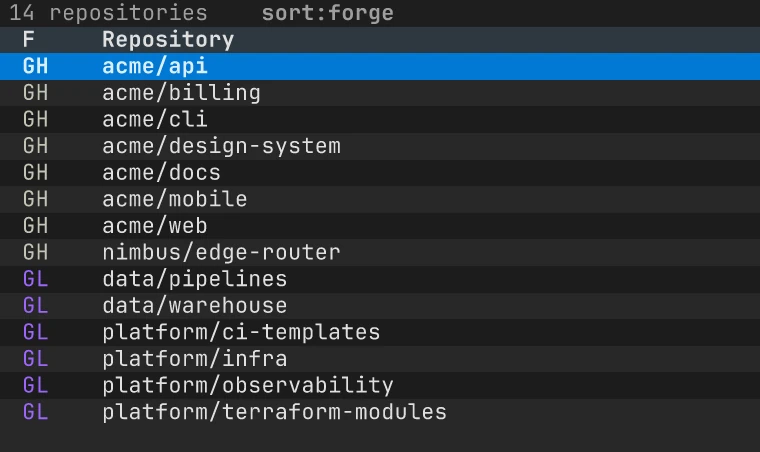
- Press r to open the repo list.
- Press / to filter repositories by name. Esc closes the filter and clears it.
- Press f to cycle the forge filter: All, GH, GL.
- Press s to cycle the sort order: name, forge, host.
- Press Enter on a repository to open an inbox for that project only.
The scoped inbox has the same three tabs and hides the Repo column. Press r or Esc to go back to the repo list, and Esc again to return to the full inbox.
Refreshing
Section titled “Refreshing”Press CtrlR to reload the current tab from the forge. All Open normally
reads through the local cache, which keeps each list for mr_list_ttl seconds
(60 by default); a refresh skips that cache and stores the new list in its
place. Retrying or cancelling a pipeline also drops that repository’s cached
list, so its CI status is read again. A failed sign-in is otherwise
remembered for a minute; a refresh retries it once it is a few seconds old, so
a fixed token works without waiting. The desktop app’s Refresh reviews button
does the same. In the repo list, CtrlR scans the
scan root again.